Blacksn0w RC2: Unlock iPhone 3.1.3 05.11.07 Baseband

BlackSn0w RC2 to unlock iPhone 3.1.3 05.11.07 Baseband is now released in Cydia. Blacksn0w RC2 is based on original BlackSn0w and the fix recently released by MSFTGuy to unlock Baseband 05.11.07 on iPhone Os 3.1.3.

blacksn0wBlackSn0w RC2 is not released by GeoHot. The guy behind Push fix 2.0 has repackaged it for you.

IMPORTANT

  • You must be running iPhone firmware 3.1.3
  • You iPhone firmware must be 05.11.0
  • Back up your iPhone via iTunes first

If you could not patch and install the blacksn0w manually, BlackSn0w RC2 has made it very easy for you by appearing in Cydia. Your iPhone 3GS and 3G must be jailbroken first and MUST be on Baseband 05.11.07. You can preserve your baseband at 05.11.07 and update to firmware 3.1.3 using a custom firmware created with Sn0wbreeze or PwnageTool:

In order to unlock iPhone 3GS and 3G on Baseband 05.11.07 running iPhone OS 3.1.3 with BlackSn0w RC2, simply follow the step-by-step guide below..

Disclaimer: This guide is for educational and testing purposes only. Use it at your own risk.

Unlock iPhone 3GS, 3G Baseband 05.11.07 on 3.1.3

Assuming that you’ve jailbreak your iPhone, now you can unlock iPhone 3.1.3 Baseband 05.11.07 using Blacksn0w RC2.

STEP 1

Run the Cydia from your iPhone Springboard.

STEP 2

Add the following source to Cydia:

http://cydia.pushfix.info

(How to add a source to Cydia)

STEP 3

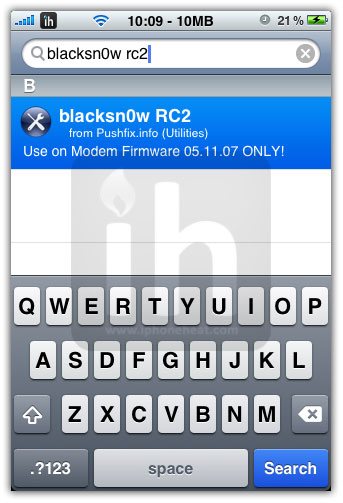
Once you have added the above mentioned source, go to Search tab and search for blacksn0w rc2 and install it.

It will unlock your iPhone 3GS and iPhone 3G.
STEP 4

Reboot your iPhone.. That’s it

You have successfully unlocked iPhone 3GS, 3G firmware 3.1.3 on 05.11.07 baseband.

If you’re looking for iPhone jailbreak, we have already shared tons of guide on jailbreaking iPhone 3GS, 3G, 2G running iPhone OS 3.1.3 using RedSn0w, Sn0wbreeze and PwnageTool. You can jailbreak iPod Touch using our guides on RedSn0w 0.9.4, Sn0wbreeze and PwnageTool 3.1.5.

You can follow us to Twitter, Join our Facebook Fan Page, and also Subscribed to RSS Feed to receive latest updates on iPhone, iPod Touch and iPad.

Update 1:

UltraSn0w 1.0-1 is OUT now.
How to: Unlock iPhone 4 iOs 4.0.1 with UltraSn0w 1.0-1

If this page or section of the page needs to be updated, Submit Request

Share/Save this Post

  • Digg
  • Twitter
  • StumbleUpon
  • Facebook
  • Reddit
  • del.icio.us

Comments:

  1. adslian 23 March 2010 at 2:29 am #

    hi there when will the unlock be out for the iphone

    iphone 3g firmware 3.1.3
    baseband 05.12.01

    i know the jailbreak is already out just wondering how long befor the unlock

    • iPhoneHeat 23 March 2010 at 2:57 am #

      may be with a major firmware release.. can’t tell the ETA..
      all depends on the dev team

      • vesh 23 March 2010 at 8:14 am #

        can you tell me what is the jailbreak for 3gs 3.1.3 ver 05.12.01 . my problem is stuck in emergency screen , usb connected with itunes and there is a lock sign

        • iPhoneHeat 23 March 2010 at 3:42 pm #

          downgrade to OS 3.1.2 if you’ve shsh save via cydia and then jailbreak using sn0wbreeze or anyother tool..
          without shsh you can’t downgrade so can’t jailbreak either

  2. soren1974 24 March 2010 at 2:05 am #

    hi folks
    i hope you can help me. I am knew to this and have met the criteria and followed the guide above, which all seems very straight forward, however upon restarting “with my vodafone sim”, i have my phone saying “Different SIM detected, please connect to itunes”. Is this safe to do?

    thanks

    Soren1974

  3. bibhukesh 24 March 2010 at 10:40 am #

    sir, i did the same above on my 3gs ,fw sn0wbrz 3.1.3, bb05.11.07, my sim was in phone , 3G was off, after installing RC2 FROM CYDIA,fone start searching network….even after 30mint cld nt get signal and freeze, after stuck at apple logo. Help me friendz iam suffering like anything.

  4. BB 23 April 2010 at 12:21 am #

    I Managed to unlock my iphone with blacksn0w , OS3.1.3 and firm 05.11.07.

    But When I restart my iphone I have to keep and re-installing Blacksn0w for the unlock to work again .
    This is normal ? If not what is the fix /..

    Thanks

  5. junks 2 June 2010 at 3:21 am #

    WORKS! 3GS 3.1.3(sn0wbreeze) 5.11.07

    I found your manual patch instructions, then the Update link to this page with the blacksn0w RC2 info. Thank you IPHONEHEAT!

  6. hannah 3 June 2010 at 7:15 pm #

    I have tried this several times now, and every time I get to the end and my phone no longer has service (always “Searching”) or WiFi. When I reset network settings, the phone restarts and finds a network, but after a few seconds (10 at the longest) it goes back to “Searching”.

    I have a 3G with 3.1.3 and 5.11.07. I have an activated SIM card (AT&T) but am trying to unlock as I am abroad for several months. I’m very new to all of this, but I’ve followed instructions carefully and can’t figure out what’s going wrong. I can’t find a solution anywhere… help please??

    • iPhoneHeat 4 June 2010 at 2:46 pm #

      which custom firmware did u use to jailbreak ur iPhone?
      activated or NOT activated?

  7. Abhinav 6 June 2010 at 5:07 pm #

    WOW thanks friends i got my iphone back to life following the instructions….. would like to also than Team Dev for their last ditch method after i played around with spirit and damaged the iphone operating system.. finally my phone is working combining method of last ditch ( which prevented the modem filmware update ( after which i faced no service ) and the method described on this page.) thanks a lot friends i can now u use my iphone again………

  8. Tahir 12 June 2010 at 12:48 pm #

    Hi, I have problem in my 3gs with baseband 05.11.07. After I unlock it with blacksn0w RC2, it is working fine but yesterday I am using net on the phone, first automatically its network go out and then it’s stuck and when I do the hard rest and when phone turn on it is only searching the network when I go to the setting to check about its version(In About) the phone goes stuck. But when I remove the blacksn0w RC2 from phone. Everything working fine. So plz send me the possible solution from where I can unlock my phone.

    • iPhoneHeat 12 June 2010 at 3:49 pm #

      remobe BlackSn0w from Cydia and reinstall

      • Tahir 14 June 2010 at 1:03 pm #

        Sir I already done this, remove and reinstall blacksn0w RC2, but all in vain. so plz give me some other solution if u can?

        • junks 20 June 2010 at 1:14 am #

          Same for me. It was working originally, then after using Internet Tethering, it doesn’t work. I get:

          Searching…
          Can’t find Wifi signals, bluetooth unavailable

          When I uninstall RC2, it works. When I reinstall, Searching…

          • iFony 22 June 2010 at 6:52 pm #

            Any solution here???? The same problem on my phone, as soon as i install blacksn0w RC2 I get that “Searching Loop” and other freaky stuff is happening. I reinstalled and I even upgraded to iOS4 without upgrading BaseBand but still the same Issue.

            kind regards

          • junks 23 June 2010 at 10:54 pm #

            If RC2 isn’t working, uninstall it and use the NEW 100% working solution for ALL basebands ALL iphones 3.1.3 and lower: install ultrasn0w 0.93 from Source http://repo666.ultrasn0w.com.

            I have it working now on my 3GS 3.1.3 5.11.07.

            http://www.iphoneheat.com/2010/06/unlock-ios-4-0-05-13-04-baseband-with-ultrasn0w-0-93/

            To jailbreak 4.0 with PwnageTool 4.01 (released June23) (and then use ultrasn0w to unlock) see if your device is supported at http://blog.iphone-dev.org/post/726179754/foursome-news (currently 3GS new bootrom not supported). Also, PwnageTool 4.01 is only available for Mac so you have to find a PwnageTooled.ipsw Can someone please post a link?

  9. neo_styles 14 June 2010 at 1:57 am #

    I can verify this method works. It was a pain in the butt trying to do all this manually so I have to give a huge thumbs up to the guys at PushFix for compiling this.


Leave a Reply