How to Unlock iPhone 3GS, 3G OS 3.1.2 Baseband 05.11.07 Using BlackSn0w

As you would know by now that GeoHot has released BlackSn0w to unlock iPhone 3GS and 3G on Baseband 05.11.07. So, it’s time to write a guide on how to Unlock iPhone Baseband 05.11.07 using BlackSn0w.

In order to use BlackSn0w, you need to jailbreak your iPhone3GS, 3G first using BlackRa1n RC3. Your iPhone MUST have Baseband 05.11.07.

Update to OS 3.1.2, Baseband 05.11.07 and Jailbreak your iPhone with BlackRa1n RC3:

How to Jailbreak iPhone, iPod Touch OS 3.1.2 Using BlackRa1n RC3

ATTENTION loyal BlackRa1n user: (If you’re NOT a loyal BlackRa1n user please skip this step and continue.)

If you’re a loyal BlackRa1n user and still have BlackRa1n.app icon on your iPhone,you don’t need to jailbreak again just open the BlackRa1n from iPhone and hit the Ra1n button. You will see Icy replaced by an option “ra1n“. Install this to upgrade your app. After upgrading, run blackra1n.app again. You will see “sn0w”. Install this, and enjoy your unlocked iPhone.

unlock-iphone-blacksn0wunlock-iphone-blacksn0w-02

Users who have already jailbroken their iPhones with Baseband 05.11.07 can Unlock their iPhone in two ways.

  1. From Cydia
  2. Using BlackRa1n.app

Both methods to Unlock iPhone Baseband 05.11.07 are mentioned below (Use any one of these).

1- Unlock iPhone Baseband 05.11.07 Using BlackSn0w (Cydia)

Open the Cydia and go to Manage Tab and Select Sources.
Press the Edit button at top-right

unlock-iphone-baseband-051107-blacksn0w-1unlock-iphone-baseband-051107-blacksn0w-2

Press the Add button at Top-Left
Input the Source: http://blackra1n.com and hit Add Source.
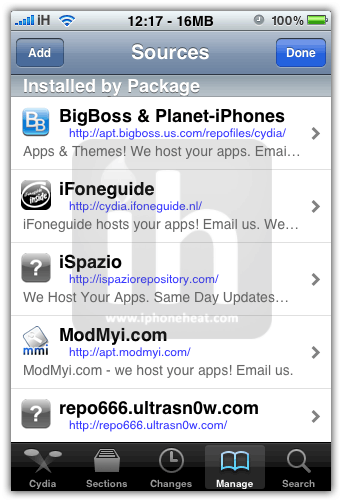
unlock-iphone-baseband-051107-blacksn0w-3unlock-iphone-baseband-051107-blacksn0w-4

Now Press Return to Cydia button.
then press Done at top-right

unlock-iphone-baseband-051107-blacksn0w-5unlock-iphone-baseband-051107-blacksn0w-6

Now select the just Added BlackRa1n.com Source.
Then Press BlackRa1n to install it

unlock-iphone-baseband-051107-blacksn0w-7unlock-iphone-baseband-051107-blacksn0w-8

Press the Install button at Top-Right
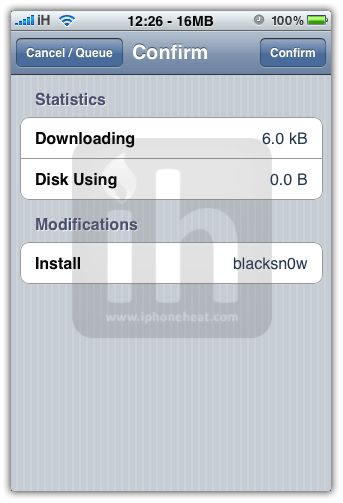
Then Press the Confirm button at Top-Right

unlock-iphone-baseband-051107-blacksn0w-9unlock-iphone-baseband-051107-blacksn0w-10

That’s it… You have successfully unlocked iPhone on Baseband 05.11.07.

2- Unlock iPhone Baseband 05.11.07 Using BlackSn0w (BlackRa1n.app)

Now considering that your have successfully jailbreak your iPhone using BlackRa1n RC3 using the guide linked above.

Open the BlackRa1n app from your iPhone

jailbreak-iphone-ipod-touch-3-1-2-blackra1n-(5)

You will find three packages available there.

Press the Sn0w option to unlock your iPhone 3GS, 3G Baseband 05.11.07 and hit the install button.
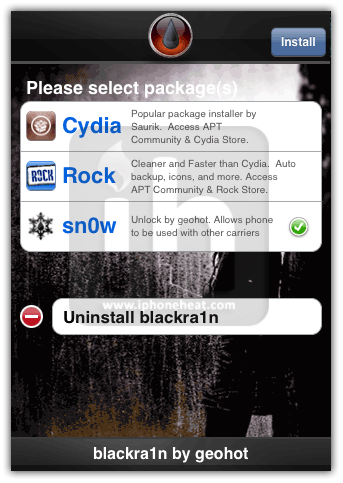
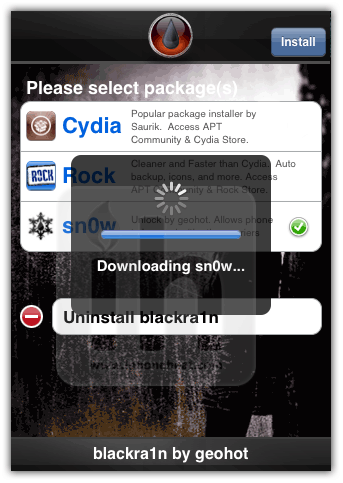
unlock-iphone-os-312-baseband-051107-blacksn0wunlock-iphone-os-312-baseband-051107-blacksn0w-1

BlackSn0w will be downloaded and then installed.

You will be presented with a Post Install log for Blacksn0w. CommCenter will be restarted and there is no need to reboot. If your carrier doesn’t support 3G then disable it. Press the Close button to continue.

unlock-iphone-os-312-baseband-051107-blacksn0w-2unlock-iphone-os-312-baseband-051107-blacksn0w-3

Your iPhone will then be Respring.

Congratz! you have successfully unlocked iPhone OS 3.1.2 on Baseband 05.11.07.

If you’re having issues with WiFi, YouTube, or GPS then follow this guide:

How to Fix WiFi, YouTube, and GPS Issues of BlackSn0w Unlock

Jailbreak iOS 4.0

Unlock iOS 4.0

Update 1: Jailbreak iOS 4 with PwnageTool

Update 2: Jailbreak iPhone 3GS iOS 4 with PwnageTool

Update 3: Jailbreak iPhone 3G iOS 4 with PwnageTool

Update 4: UltraSn0w 0.93: Unlock iPhone 3GS, 3G (All Baseband)

Update 5: Unlock iPhone 3G iOS 4 with UltraSn0w 0.93

Update 6: Unlock iPhone Baseband 05.13.04 with UltraSn0w 0.93

Update 7: Unlock iPhone Baseband 05.12.01 with UltraSn0w

Update 8:
UltraSn0w 1.0-1 is OUT now.
How to: Unlock iPhone 4 iOs 4.0.1 with UltraSn0w 1.0-1 Baseband 01.59.00

If this page or section of the page needs to be updated, Submit Request

Share/Save this Post

  • Digg
  • Twitter
  • StumbleUpon
  • Facebook
  • Reddit
  • del.icio.us

Comments:

  1. ahmad 4 November 2009 at 1:17 am #

    im the first guy yeah and guess what i luv u people

  2. i hav a problem 4 November 2009 at 1:24 am #

    my phone says no service and it says calling but you don’t hear a dial tone

    • iPhoneHeat 4 November 2009 at 1:30 am #

      Try Network reset

      • Leonardo 8 November 2009 at 2:19 pm #

        Tried.

        Nothing happened… please, any more ideas?

        Thanks guys!

        • Faz 15 December 2009 at 12:15 pm #

          Yes, your phone is blocked by the network.
          You can’t use it where you live, sell it to someone in another country.

  3. robin 4 November 2009 at 1:27 am #

    WOW!
    excellent guide..
    just Unlocked my iPhone thank to GeoHot for Unlocking Baseband 05.11.07.
    Thanks you so much

  4. ahmad 4 November 2009 at 1:31 am #

    yo man i luv u fixed it now i luv dev team and geo hot is good BYE

    • iPhoneHeat 4 November 2009 at 1:37 am #

      gud to know that..
      btw- which iPhone you Unlocked using this guide?

  5. i hav a problem 4 November 2009 at 1:39 am #

    Hear is a tip wait approximately 5 mins then insert tmobile sim then go to settings and cilk carrier and wait till your bars go up then call.

    And im using iphone 3g jailbroken and unlocked (thanks to Geohot) after using custom software

    • iPhoneHeat 4 November 2009 at 1:45 am #

      thx for the input Ahmad..
      here’s a lil. addition to the tip
      For T-Mobille you need to disable 3G too..

      • itouchipod 5 November 2009 at 5:58 am #

        I have a few questions. I had my phone originally jailbroken through quikpwn. Do I have to re-jailbreak for this to work? I downloaded blackra1n through Cydia, but I didn’t see a blackra1n icon or app logo on my iPhone. Did I do something wrong? I inserted my t-mobile card, but it still said no service and I couldn’t make any calls.

        • iPhoneHeat 5 November 2009 at 4:02 pm #

          You need to perform a simple restore @ 3.1.2 then jailbreak using BlackRa1n and then unlock using BlackSn0w (Make sure 3G is disabled)

      • itouchipod 5 November 2009 at 6:01 am #

        Someone please help I am in urgent need….P.S( Geohot you Rock awesomely dude… u have turned me into a believer dude… thnx for all your work…) Still having a little trouble unlocking my iPhone but thanx anyway…./.

  6. ahmad 4 November 2009 at 1:46 am #

    well u know what i didn’t disable 3g and its still sending and recieving calls

  7. jmatthews007 4 November 2009 at 1:54 am #

    I have a question I have 3g phone on 3.0 but would like to upgrade to 3.1.2 and still want the jailbreak/unlock would i upgrade first through itunes the use blakrain thanks for any help

    • iPhoneHeat 4 November 2009 at 2:06 am #

      Follow the jailbreak guide link in the start of this guide..
      yes you need to update.. then jailbreak and unlock

  8. user1 4 November 2009 at 4:44 am #

    Trying to install via Cydia but consistently getting the following error:

    Sub-process bzip2 returned an error code (2)

    Note that I already jailbroke using the original blackrain and not RC3

    • iPhoneHeat 4 November 2009 at 2:02 pm #

      Then why not perform a simple Restore and user BlackRa1n RC3..
      If you already have BlackRa1n.app on your iPhone then simple follow the first two screenshots about updating and then using blacksn0w

  9. rewl86 4 November 2009 at 3:19 pm #

    mine cant connect wi-fi..what happen?

    • iPhoneHeat 4 November 2009 at 4:32 pm #

      Just reset network settings :)

      • rewl86 4 November 2009 at 11:27 pm #

        i reset both router and iphone..still de same.. try with other public network wi-fi its just cant search after i unlock with geohot…

        • iPhoneHeat 4 November 2009 at 11:51 pm #

          GeoHot recommends to Reset Network Settings from iPhone and it does solve the problem..

  10. ammar 4 November 2009 at 10:32 pm #

    hi.. I have just jailbreak and unlocked my iphon with blackra1n n installed cydia, worked like a charm… but all my apps n games don’t work. Once you click on an app it comes up for a millisec and gone! pls help

    • iPhoneHeat 4 November 2009 at 10:36 pm #

      are u trying cracked apps? or purchased?

      • ammar 4 November 2009 at 10:40 pm #

        purchased from iTunes

        • ammar 4 November 2009 at 10:55 pm #

          do u have any idea what is going wrong??? pls help me..

          • iPhoneHeat 4 November 2009 at 11:00 pm #

            Try a fresh restore and jailbreak again.. It’s kinda new to me
            Try resyncing Apps

          • ammar 4 November 2009 at 11:34 pm #

            bro i have tried before what did u mention just now but the problem still same,, after that i downgraded to 3.0.1 jailbreak again all apps worked well, just unfortunate that blackra1n not working with 3.0.1 to unlock my iphone…. so pls if there’s any resolution just update me

            thanxxx

          • Faz 5 November 2009 at 12:57 am #

            u need 3.1 or 3.1.2 for blackra1n and blacksn0w to work.
            First u’ll need to update ur phone via iTunes to 3.1.2 then jailbreak then unlock then re-sync
            All should work fine.

  11. Sayyar 4 November 2009 at 11:21 pm #

    Thank you very much
    and easy step to unlock your Iphone 3GS 3.1.2

    Thank you again.

  12. Faz 5 November 2009 at 1:00 am #

    Mine works for the bl00dy first time I got it out of the box as when i got it new it was on 3.1
    Update my iPhone 3GS to 3.1.2, jailbroken with blackra1n and unlocked with blacksn0w, everything works inc 3G wifi not a problem.
    Thanks to Geohot
    Faz

  13. Rich 5 November 2009 at 7:39 pm #

    Is it possible to know if my phone 3gs was unlocked using blacksn0w without using another sim, which i don’t have. Redsnow on my old 2g had added a tab in settings called carriers. Thank you for your time.

  14. popotamito 7 November 2009 at 2:57 am #

    Hi, does anybody know if is normal having JB the iphone with BlackRa1n after shutting down and trying to turning on, indicate that I have to connect it to itunes, so what I did is JB again with BlackRa1n and star working again. My question is there anything that I can do to avoid that process, meaning a normal turning on?
    Thanks.

    • Tato 8 November 2009 at 9:27 pm #

      yeah that’s exactly what had happened to me so please …
      guys we have the same prob can anybody help us ?

      • iPhoneHeat 8 November 2009 at 9:45 pm #

        The latest iPhone 3GS units supports tethered jailbreak only which means everytime you restart/turn off your phone or it goes Off coz of power outage.. you need to jailbreak it again :)

        • Tato 8 November 2009 at 9:58 pm #

          so that’s will b for good ?
          or we should expect solution nearly?

          • iPhoneHeat 8 November 2009 at 10:38 pm #

            all depends on Dev-Team/GeoHot..
            There’s no time frame of releasing a permanent jailbreak for latest 3GS units .. sorry

  15. Tato 7 November 2009 at 8:49 am #

    I just bought an IPhone 3GS from apple store with no contract but it’s locked …. when i powered it on it says connect itunes ..it’s my first time to iphone and i wanna do it myself as many of my friends recommended you to follow
    so please what should i do step by step … how to activate and then jailbreak or just jailbreak ..i’m really confused so please guide me the steps starting from connecting the new phone to i tunes i don’t even know what firmware is running

    thanx in advane .. i do trust u

  16. kissme 8 November 2009 at 11:57 am #

    i did everything it told me to do. I jail broke my 3G iphone with no problems and unlocked it with blacksn0w. All my apps are running fine as well as my wifi. Unfortunately one problem. I have no service, I am from canada and using a rogers sim card. everytime i press airplane mode to on and off it searches but doesn’t find any carriers. Now my phone can’t make calls :( I seriously need help. What have i done wrong?

    • iPhoneHeat 8 November 2009 at 8:52 pm #

      Did you reset your network settings?
      Settings > General > Reset > Reset Network Settings

      • kissme 10 November 2009 at 10:23 am #

        yes i did that as well but same thing…my only option now is to go out and get a new brand new Iphone 3Gs but i really don’t want to:( What a waste of a phone!!! Any other options? Is there any possible way I can fix it or go back to a 2.2 version?

        • kissme 10 November 2009 at 10:30 am #

          Also when it detects my carrier it does have rogers with a check mark but it still says no service. Then when i go to About…where it says carrier it says carrier 5.0. When it searches for a network, most of the time it pops up a message saying ” Network Lost. Your selected cellular network is no longer available. You can choose a different network in Settings”
          I really screwed up my phone haven’t I? PLEASE HELP!!!!

          • iPhoneHeat 10 November 2009 at 5:33 pm #

            No need to get a new one.. We can fix it.. Only thing you need is patience..

            Why not reinstall BlackSn0w.. if you did it via BlackRa1n why not download this time from Cydia?

            and after install.. Reboot your iPhone.. Got signals? NO? Reset Network Settings.. your phone will reboot ..
            come back with results

          • dzamala 8 December 2009 at 12:10 pm #

            Hi
            I have the same problem. I have an ipohne 3g os 3,1,2 jb with blackra1n and tried to unlock with blacksnow and cydia too. But the No service still remain.
            I’ve already reset my network setting also; I’m really desperate please can u guys help me with my precious.
            Best regards

          • iPhoneHeat 8 December 2009 at 4:07 pm #

            if it’s Tmobile then turn 3G off.. then install blacksn0w..
            also reset network settings in the end

      • freepass 19 December 2009 at 8:09 pm #

        HI,I had to wait almost 10 min for the different carrier’s network to pop up…Just like *iPhoneHeat* said before: you gotta be patient:)

  17. ipoditouch 9 November 2009 at 11:05 am #

    I had quikpwnage and blacksn0w on my iphone 3g S, but because I was unable to get Youtube, Internet or GPS to work. I have restored it. I tried using blackra1n to jailbreak, but no success. I guess because I don’t have an AT&T sim card it won’t let me continue. It sent me to connect with iTunes screen. How do I bypass this? I even got it to DFU mode but still no success. Please help!!!

    • iPhoneHeat 9 November 2009 at 7:03 pm #

      What happens when you try BlackRA1n?

      • ipoditouch 9 November 2009 at 7:21 pm #

        it goes through the whole process and even through make it ra1n, but nothing happens… the iphone screen remains the same. i did the original restore and even insterted an unactivated att sim card but no success with the jailbreak. it did however, get it out of the “connect to iTunes” part

        • iPhoneHeat 9 November 2009 at 9:26 pm #

          Hold down the both home and Power buttons at the same time.. keep holding until iPhone reboots and turn back on with connect to iTunes screen..
          iTunes will detect your iPhone in recovery mode..
          if it doesn’t atleast it will ask you to let iTunes check your iPhone model.. Press the check button..
          Once your iPhone is detected by iTunes.. Perform a Fresh restore..
          Once done.. you will be stuck at emergency screen..
          now again put your iPhone into Recovery mode by Hold down the both home and Power buttons at the same time until you get to the connect to iTunes screen..
          this time run the BlackRA1n.. and come back with results..

  18. ipoditouch 9 November 2009 at 11:06 am #

    I tried several times and in 2 occasions I got an error 1600. I am not sure what am I doing wrong. Any suggestions?

    • ipoditouch 10 November 2009 at 6:05 am #

      iPhone heat ur a genius…. it worked ur awesome!!! it work im gonna try the rest of the process and get back to you….. thanks dude!! u rock

  19. ipoditouch 10 November 2009 at 6:50 am #

    Okay, it worked, but now Im having the same problem with the internet, youtube and gps. I downloaded cydia.iphoneil.net and even got the newer “push fix youtube” but it still doesn’t work. The internet is not working I am going to try this same process again and hope it will work.

    • ipoditouch 1 December 2009 at 10:37 am #

      I finally fixed my problem. The problem was that after entering the information from tmobile. I was suppose to turn wifi off and 3G then turn phone off and turn it back on to fully operate.

  20. lololabrute 18 November 2009 at 7:27 am #

    So, here’s a new one for all of you :

    I have a new 3G S, have installed blacksnow and all is working fine (i’m in canada, using Fido sim card) except the tethering when I am using the bluetooth function. Tethering only works when the phone is plugged to the computer. As soon as I try to the same with the phone unplugged, I lose the connection 2 seconds later (i get the “no service” sign).

    Any pointers re this?
    otherwise, i have no wifi problem, no gps problem. Only the bluetooth tethering.

    If anyone has a clue, please let me know.

    L.

  21. ReeF 29 November 2009 at 10:03 am #

    I have jailbreak my 3gs 3.1 using custom restore 3.1.2 and it went ok. I got cydia on my iphone.
    Then i followed the steps-by-steps above by downloading blackrain thru cydia. Then it says PROFIX: Operation timed out. POSIX: Operation timed out.

    Help me pls…

    • iPhoneHeat 30 November 2009 at 12:24 pm #

      Custom restore is much better way imo..
      did you perform a simple restore using Official IPSW file or trying blackSn0w on custom firmware?

  22. iphoneuser 29 November 2009 at 10:13 am #

    Hi,
    I have a new 3G 8GB iphone from AT&T , I tried to Jailbreak and unlock it as suggested in the web page. I did not see much error messages on the process, but now when I tried your DiskAid tool, When I go to root folder it gives me a warning that only jailbreaked device can show the root partition, I am able to see the root partition but with limited folders.

    I am not able to set wallpaper anywhere , even if I set it is just displayed for 0.5 sec when I restart the device.

    please advice how to reset and make sure that I have unlocked the phone.
    a
    Thanks!
    Maruthi S

    • iPhoneHeat 30 November 2009 at 12:25 pm #

      Perform a Simple restore using Official firmware.. then use BlackRA1n again

  23. iphoneuser 29 November 2009 at 10:18 am #

    adding more tech details about my unlocking process.

    3.1.2 (7D11) and modem firmware 05.11.07

    i did not turn off wifi when doing the jailbreaking and unlocking process.

    I have tried both the method blackrain and Cydia, I have tried with cydia method after closing the wifi to off mode.

    please help me in unlocking my phone.

    Thanks!
    Maruthi S

  24. marcohoes 30 November 2009 at 11:47 pm #

    I have a 3GS 32GB, from juli. 3.1.2; baseba 05.11.07 It comes from Italy so it has no simlock.
    Can I jailbreak the phone with Blackrain. Does anyone has experience with this situation?
    Thanks for reacting.

  25. craighjones 2 December 2009 at 5:41 pm #

    Hi,

    Experiencing the same issues, My iPhone is jailbroken with blackra1n and unlocked with blacksnow and I’m using Orange as a carrier within the UK.

    WIFI works fine and so do calls until I loose a signal, then I have to insert my SIM into my old phone and then back into my iPhone and boom! A full signal.

    I’ve just returned from Amsterdam where I used my Orange UK SIM and iPhone connected to a Dutch carrier experiencing no problems at all even when I lost signal.

    Why would this happen?

    Cheers

    • iPhoneHeat 2 December 2009 at 8:01 pm #

      Insert the SIM and reset network settings..
      Settings > General > Reset > Reset Network Settings

  26. lazarog112 8 December 2009 at 10:43 pm #

    I purchased my iphone 3gs 1 week ago every time i jailbreak it and i install winterboard after it reboots it crashes and I have to restore it back thru apple why is this happening?

    • iPhoneHeat 8 December 2009 at 11:34 pm #

      Because latest units are tethered jailbreak only.. which means you need to run blackra1n on each reboot

      • lazarog112 9 December 2009 at 1:38 am #

        thanks very helpful, it worked

  27. lazarog112 8 December 2009 at 10:48 pm #

    I have it with AT&T

  28. nap28 15 December 2009 at 1:34 am #

    hi..
    i jailbreaked my iphone 3g firmware 3.1.2 n unlocked with snow bt i cant open cydia ..
    plz can u help me
    its urgent
    thnxs..

    • iPhoneHeat 15 December 2009 at 1:38 am #

      what happens?

      • nap28 15 December 2009 at 2:03 am #

        wen i tap on cydia it loads for few seconds n den it goes away. i jailbreaked it using blackra1n
        i unlocked my iphone 3g using snow
        bt i ned cydia
        i reinstalled d 3.1.2 firmware twice jailbreaked it twice n also unlocked bt still cydia doesnt open help me

  29. nap28 15 December 2009 at 2:12 am #

    hello plz can u help me out fast

  30. sai 19 December 2009 at 12:51 pm #

    hello iphone heat, my phone is 3GS 32GB version 3.1.2, baseband 05, i did the blackra1n jailbreak guide line, after that i unlocked my phone by snow and everything is ok, but after reboot or power on , it is still need to run blackra1n, how can i do it. ple guide to me

    • iPhoneHeat 19 December 2009 at 7:23 pm #

      Because you purchased 3GS after September. the latest units are tethered jailbreak only.. means whenever you’d reboot your iPhone (you lose jailbreak) you’d need to run blackra1n again

      • sai 27 December 2009 at 3:42 pm #

        thanks iphone heat

  31. kidlat 24 December 2009 at 10:19 pm #

    i phone 3gs baseband 5.11.07

    i installed blackra1n and cydia,rock and snow after that everythings working and uninstalled blackra1n but once you turn the phone off it goes back to the display that you have to connect to the i tune s … i really do appreciate if you guys can help mke

  32. FreePass 25 December 2009 at 9:03 am #

    Hi there,
    I just jailbroke another 3GS 16GB and unlocked it as I always did.At this time I just swap out ACTIVE ATT Sim-cards and the iPhone went into emergency mode saying it doesn’t recognize a sim-card.As soon as I put back the original sim-card with which the iPhone was activated via iTunes and the phone works again!.I never had this problem before and I jailbroke/unlocked multiple iPhones.I don’t understand what’s seem to be the problem with the unlocking?:(
    Thanks in advance

    • iPhoneHeat 25 December 2009 at 10:14 am #

      it’s strange..
      why now reinstall blacksn0w while putting in the Sim which is not working.. ofcorse you need to run blackra1n to bypass emergency screen

      • FreePass 27 December 2009 at 7:33 am #

        Hey iPhoneHeat,
        I connected an iPhone to iTunes with a different working ATT Sim in order to run blackra1n.The phone went dead…I tried to restore it and it’s still dead only with a white screen at this time.Then I tried to restore again with the original Sim card from DFU mode- no response.And the window within iTunes saying:*Defective Phone blah blah blah*.Tomorrow morning I am shipping it back for exchange for another one.
        So it was very interesting experience….

        • iPhoneHeat 27 December 2009 at 10:10 am #

          Never read anyone saying that he encountered such error from iTunes..
          One of my regular readers, is the first one reporting it.
          can you please send me a screenshot? I really wanna see it :)

          • freepass 27 December 2009 at 7:44 pm #

            sure I will send you a screenshot without blah blah though:)

          • FreePass 30 December 2009 at 4:36 am #

            Hello again,
            I got the new iphone and followed your directions from this post.But strange things are happening again:the phone is unlocked and showing a sim card from different carrier,but the screen remains in the Emergency mode.However,I can make a phone call TO my phone and even have a conversation,but I cannot dial out due to the emergency screen.Is there way to resolve this please?
            Thank you.

          • FreePass 30 December 2009 at 4:40 am #

            I forgot to mention that together with an emergency screen there is a message saying “Different SIM detected.Please connect to iTunes”. So I did and iTunes is telling me that my phone cannot be activated.Wonder why:)

          • iPhoneHeat 30 December 2009 at 9:10 am #

            Your phone is NOT jailbroken

          • FreePass 30 December 2009 at 11:32 am #

            was it addressed to me? if yes,what can I do to complete jailbreak? Remember,I’ve done it multiple times and this is first time happening to me.
            Thanks

          • FreePass 30 December 2009 at 12:36 pm #

            By the way, I jailbroke my gfd’s iphone,my own and this one, all in about the same time( within a couple days),and only newly arrived refurbished phones acting the way I explained earlier.If I keep an original sim in the phone and reboot it after jailbreak,it doesn’t go into recovery mode.So I know these phones were operational before September 2009.
            So any idea on what might be the problem??

  33. Kmahirz 25 December 2009 at 1:13 pm #

    Hello iPhoneHeat my problem is that the wifi is not working on my iPhone 3G 3.0.1 but its jailbreaked now i do not know how to unlock the iphone without wifi. DiskAid works on my pc (Windows) but it does not showing the contents of the iphone.
    sometimes iPhone detects wifi but one time in hundereds of tries.
    Kindly help me and tell me how to unlock the it on windows.
    kmahirz@yahoo.co.uk

  34. Kmahirz 25 December 2009 at 1:20 pm #

    i forgot to tell you that the base band is also upgraded to 5.11.7, is there any way to downgrade the baseband on windows. or unlock the iphone with the same baseband! using iPhone 3G 3.0 (7A341) with the baseband 05.11.07 (Modem firmware)
    Need Help

    • iPhoneHeat 25 December 2009 at 5:07 pm #

      you can get WiFi back by resetting the network settings
      Settings > General > Reset > Reset Network Settings

      @ baseband..
      there’s no need to downgrade because it’s unlockable now:
      http://www.iphoneheat.com/2009/11/how-to-unlock-iphone-3gs-3g-os-3-1-2-baseband-05-11-07-using-blacksn0w/

      • Kmahirz 26 December 2009 at 10:36 pm #

        I’ve already reset the network settings but no wifi found, infact i am looking the thing to unlock my iphone without wifi and internet or is there any other way to use my windows pc internet on the iphone! kindly guide me if there is any chance to . .

  35. E.H 1 January 2010 at 6:34 pm #

    Hey
    tanx
    i jailbreak and unlock my 3Gs i phone with this guide but there is a problem,when i reboot or turn off my iphone it is lock abain and needed to jailbreak again…not unlock but just jailbreak..

    • iPhoneHeat 1 January 2010 at 9:10 pm #

      Because your device is tethered jailbreak.. just rerun the blackra1n whenever you reboot your device

  36. sunny 17 January 2010 at 7:44 am #

    hey guys,
    i have unlocked and jailbreak my iphone 3gs (3.1.2) successfully
    but the issue is that whenever i restart my phone it stuck’s at the recovery mode and ask to connect to iTunes …
    to activate my phone again i have to use blackrain soft or i have restore the whole version from itunes..
    any fixes for this issue
    thanks

    • iPhoneHeat 17 January 2010 at 10:21 pm #

      Just rerun the blackra1n to get to home screen.. that’s the only solution for latest iDevices for now

  37. sunny 17 January 2010 at 11:21 pm #

    thanks for ur reply,
    is there any way to unlock iphone 3gs 3.1.2 without jailbreak…
    if its there plz let me know so until unless the total solution comes i will only unlock my iphone..
    thanks

  38. hancock2403 11 February 2010 at 7:12 am #

    im having a baseband/modemfirmware of 05.12.01 how shuld i unlock this one.i hav tried every single thing u hav mentioned in the site. pls help me

    • iPhoneHeat 11 February 2010 at 3:27 pm #

      baseband/modemfirmware of 05.12.01 is not unlockable ATM

  39. Jack 11 February 2010 at 7:55 am #

    It doesn’t work. HELP!!!!!!!!!!!

  40. Faz 11 February 2010 at 4:36 pm #

    If you’ve updated your iPhone to 3.1.3 BB 05.12.01 then you’ve made a big mistake as there’s no unlock or jailbreak as of yet and maybe never.

  41. bigcstyle1 15 February 2010 at 1:36 pm #

    Hey guys i have a 3GS that i had to restore bcuz it crashed so i used snowbreeze so it has the custom firmware for 3.1.3 and is still baseband 05.11.07 but whenever i try to unlock it with blacksnow it freeze on me can anybody help me out with this please

  42. bulla 19 February 2010 at 8:40 pm #

    how to downgrade boatloader 06.05 to 05.08

  43. nuespais 3 March 2010 at 1:54 am #

    I have a iphone whith blackra1n installed. its the most and great program in the world. Today my iphone is broken software, and i must to actualize them. I have boot 05.09 and with the blackra1n and sn0w I dont have network.
    do you have a solution? urgent please

  44. jack 7 March 2010 at 1:59 am #

    sorry but we can not help you guys thats why never do it again you learn from your mistakes

  45. pirlo15 10 March 2010 at 6:23 pm #

    When they will have a software to unlock the iphone 3GS 3.1.3…….. STTIILL WAITING
    GRTZ

  46. kagdave 16 March 2010 at 5:46 pm #

    Hey guys,

    i have iphone 3gs modem 05.11.07 ran blackra1n and worked brilliantly but when i ran blacksnow, it unlocked successfully BUT when i put an orange sim into the phone just says no service, even with 3g off? anybody else have this fault?

    • iPhoneHeat 16 March 2010 at 6:04 pm #

      it’s strongly suggested Not to play with 3GS for now…
      still want to try something??
      reset network setting after inserting orange Sim

  47. berto 29 March 2010 at 11:28 pm #

    hi guys’can someone help me..i have iphone 3g,3.1.2 baseband 05.12.01 is there any way to unlock this phone?i have no network at all in my phone…

    • iPhoneHeat 30 March 2010 at 1:18 am #

      Nope… latest baseband is not unlockable at the moment.. sorry

  48. Atif 10 April 2010 at 1:41 am #

    After jailbreak I have facing NO SIGNAL and NO SERVICE problem. I have tried to jailbreak iphone from different ways but same error. I have not receiving any signal on my jailbreak iphone.

    Can any one help?

    • iPhoneHeat 10 April 2010 at 2:08 am #

      your baseband?

      • Atif 10 April 2010 at 3:17 pm #

        As berto wrote I have same 3G 3.1.2 (7D11) baseband 05.12.01. I can use Wifi without any trouble but I have facing only problem with my network signals. Can you please tell us is there any possibility to change baseband.

        • iPhoneHeat 10 April 2010 at 4:16 pm #

          take a closer look at your baseband.. it’s 05.12.01 (the latest one).. Which is NOT unlockable atm.. sorry

  49. mrb89 15 July 2010 at 1:12 am #

    In the process of attempting to update my iPhone (3.1.2/ 05.11.07) to iOS 4.0 by myself. It’s already unlocked through blacksn0w for the 3.1.2 update. For some reason the internet is not able to load. I’ve tried different codes for APN but now there is no where to put APN codes. (pic messaging not working either). In Cydia I have downloaded different carrier bundles but I can’t get anything to get internet. Not even WiFi is getting picked up at this point. I’ve noticed I have Dev-Team with yellowsn0w installed under Cydia.Help please! =(

  50. Baldwin 26 August 2010 at 8:20 am #

    you guys are the sh** i have been tryin for days this took me 20 mins thank you

Trackbacks/Pingbacks

  1. How to Jailbreak iPhone, iPod Touch OS 3.1.2 Using BlackRa1n RC3 | BlackRa1n | iPhoneHeat
  2. uberVU - social comments
  3. Steve Jobs » How to Unlock iPhone 3GS, 3G OS 3.1.2 Baseband 05.11.07 Using …
  4. Tweets that mention How to Unlock iPhone 3GS, 3G OS 3.1.2 Baseband 05.11.07 Using BlackSn0w | BlackSn0w | iPhoneHeat -- Topsy.com
  5. How to Fix WiFi, YouTube, and GPS Issues of BlackSn0w Unlock | BlackSn0w | iPhoneHeat
  6. How to Unlock iPhone 2G OS 3.1.2 and Jailbreak iPhone 2G 3.1.2 with BlackRa1n RC3 | BlackRa1n | iPhoneHeat
  7. Tether iPhone OS 3.1.2 | How to enable iPhone tethering iPhone OS 3.1.2 | iPhone | iPhoneHeat
  8. Push & YouTube Fix for iPhone OS 3.1.2 BlackSn0w Unlock | BlackSn0w | iPhoneHeat
  9. How to Unlock iPhone 3GS, 3G OS 3.1.2 Baseband 05.11.07 Using … | Geared iPhone Solutions
  10. frandsen-iBlog...
  11. Jailbreak iPhone OS 3.1.3 Firmware with RedSn0w 0.9.4 | Jailbreak iPhone 3GS, Jailbreak iPhone 3G, Jailbreak iPhone | iPhoneHeat
  12. Jailbreak iPod Touch 3.1.3 Firmware with RedSn0w 0.9.4 | Jailbreak iPhone 3GS, Jailbreak iPhone 3G, Jailbreak iPhone | iPhoneHeat
  13. Jailbreak iPhone, iPod Touch 3.1.2 with RedSn0w 0.9 | Jailbreak iPhone 3GS, Jailbreak iPhone 3G, Jailbreak iPhone | iPhoneHeat
  14. Download Sn0wBreeze 3.1.3 v1.4 to Jailbreak iPhone OS 3.1.3 | iPhoneHeat
  15. PwnageTool to Jailbreak iPhone OS 3.1.3 Coming Soon? | iPhoneHeat
  16. Download Sn0wbreeze v1.5 to Jailbreak iPhone 3.1.3 | iPhoneHeat
  17. F0recast: Get iPhone 3.1.3 Jailbreak and Unlock Info | iPhoneHeat
  18. GeoHot Has an Exploit to Unlock iPhone Baseband 05.12.01 | iPhone Theme Store
  19. Push Doctor: Fix Push Notifications on Hacktivated iPhone 3.1.3 | iPhoneHeat
  20. Blacksn0w RC2: Unlock iPhone 3.1.3 05.11.07 Baseband | iPhoneHeat
  21. Unlock iPhone 3.1.3 Baseband 05.12.01 (Hardware Unlock) | iPhoneHeat
  22. BlackSn0w RC2 Final to Unlock iPhone 3.1.3 Baseband 05.11.07 in Cydia Now! | iPhoneHeat
  23. BlackSn0w RC2 Final: iPhone 3.1.3 05.11.07 Unlock in Cydia Now! | iPhoneGrez.com | iPhone Tutorials, iPhone Firmwares, Unlock iPhone 3GS, Jailbreak iPhone 3GS, Unlock iPhone 3G, Jailbreak iPhone 3G, iPhone Apps
  24. Jailbreak iPad 3.2 with BlackRa1n (Done By GeoHot) | iPhoneHeat
  25. Jailbreak iPad 3.2 with Spirit | iPhoneHeat
  26. Jailbreak iPhone 3G 4.0 Beta1 with RedSn0w 0.9.5 Beta | iPhoneHeat
  27. Gull1Hack: Jailbreak iPhone 3GS New BootRom (Untethered)? | iPhoneHeat
  28. GeoHot Successfully Jailbreak iPad 3.2 with BlackRa1n | Jailbreak The iPad
  29. Unlock iPhone Baseband 05.12.01: GeoHot Found an Exploit | iPhoneHeat
  30. Unlock iPhone 3GS iOS 4.0 with Blacksn0w RC2 | iPhoneHeat
  31. Unlock iPhone 3.1.3 Baseband 05.11.07 with BlackSn0w | iPhoneHeat
  32. BlackSn0w Unlock for iPhone Baseband 05.11.07 + BlackRa1n RC3 Jailbreak Released | iPhoneHeat
  33. How to Unlock iPhone 3GS, 3G OS 3.1.2 Baseband 05.11.07 Using BlackSn0w | iPhoneNo1.com

Leave a Reply