How to Transfer Files From iPhone via Bluetooth Using iBlueNova

As reported earlier, iBlueNova is available in Cydia now. In this post you are going to learn how to transfer files from iPhone over Bluetooth using iBlueNova.

For those who do not know, iBlueNova is an iPhone app that let you transfer files via Bluetooth on iPhone. iBlueNova supports iPhone OS 3.x. If you’re on iPhone OS 2.x you can use the iBluetooth to transfer file from iPhone via Bluetooth.

iBluenova is the only application in the world that lets you send and receive files, music, videos and pictures to other phones using the Bluetooth natively. The application is available only for Jailbroken devices, absolute and exclusive through the iSpazio repository on Cydia.

Your iPhone must be jailbroken in order to download iBlueNova onto your iPhone. You can find jailbreak guides linked at the bottom.

How to Transfer File via Bluetooth on iPhone

Step 1

Open the Cydia. Go to Search tab and search for iBlueNova. Download and install iBlueNova.

NOTE:

  • If you want to purchase iBlueNova immediately then press the Purchase Package button.
  • If you have already purchased iBluetooth in the past or if you would like iBlueNova 15 days trial, press the Purchase button at the top right of the screen.

ibluenova iphone bluetooth transferibluenova iphone bluetooth transfer

Step 2

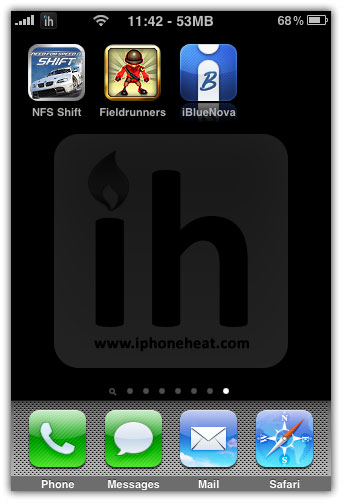
Once you’ve successfully install iBlueNova on your iPhone, close the Cydia and launch the iBlueNova from your Springboard.
ibluenova iphone bluetooth transferibluenova iphone bluetooth transfer

Step 3

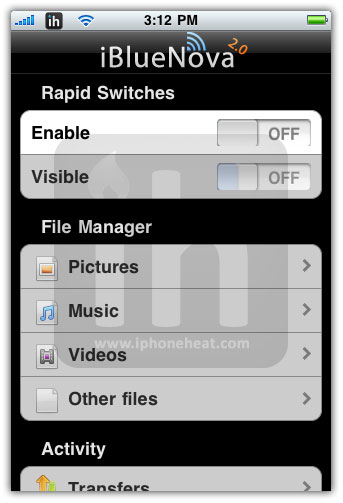
You will see two switches on iBlueNova home screen. Turning the first Switch to ON will enable iBlueNova and 2nd Switch when turned ON will make your iPhone visible to other Bluetooth devices.
ibluenova iphone bluetooth transferibluenova iphone bluetooth transfer

Step 4 – Sending a File from iPhone/iPod Touch

File Manager let you send Pictures, Music, Videos, and Other Files via Bluetooth to other devices.

Sending a Picture over Bluetooth

> Go to Pictures Menu.
> Select an album.
> Tap to choose a photo you want to send over Bluetooth.
> Tap the send button at the bottom-right of the screen
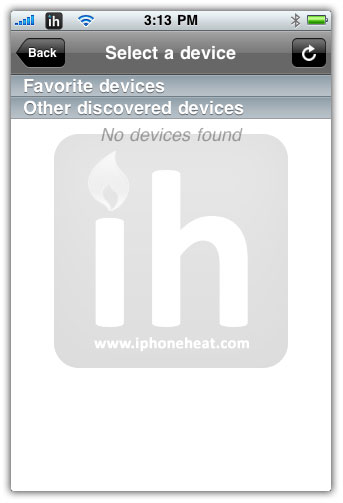
> Select the destined device. If there’s no device on the list, hit the refresh button at the top-right corner and make sure the other device is set to visible. You can also favorite a device you frequently connect to by tapping on the Star next to it.
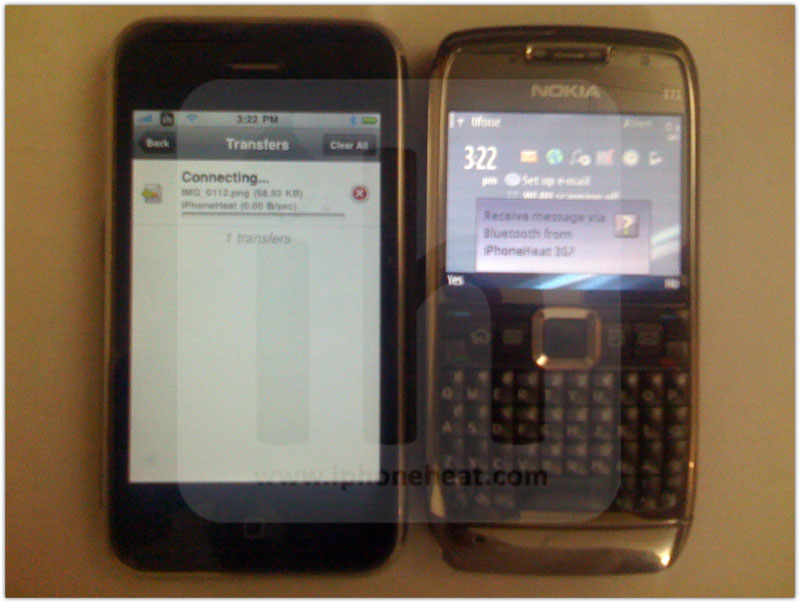
> Once the device is selected, accept the file transfer on your other device to initiate transfer from iPhone. A Progress bar will appear until the transfer is complete.

iphone bluetooth transfer ibluenovaiphone bluetooth transfer ibluenovaiphone bluetooth transfer ibluenova

iphone bluetooth transfer ibluenovaiphone bluetooth transfer ibluenovaiphone bluetooth transfer ibluenova

iphone bluetooth transfer ibluenovaiphone bluetooth transfer ibluenovaiphone bluetooth transfer ibluenova

ibluenova

Procedure is the same for transferring Music, video or other types of files via Bluetooth using iBlueNova.

Step 5

The Transfer Menu from the home page of iBlueNova gives you the overall status of all transfers.

iphone bluetooth transfer ibluenovaiphone bluetooth transfer ibluenova

Step 6

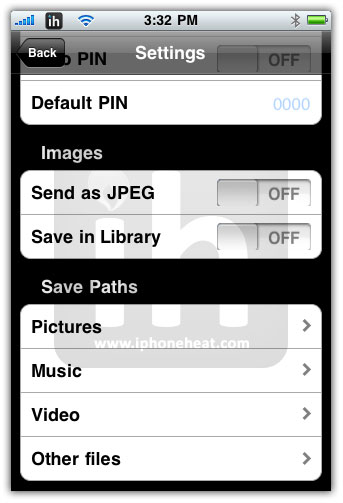
The settings Menu provides you with the following options:

  • General section let you change the name of your device, Enabling auto search, Vibrate, Re-enable on close.
  • Security section let you set a pin authentication for the connection.
  • Images section let you decide if you want to send images in JPG format instead of iPhone default PNG file format. There’s also a feature to save incoming images into the Library.
  • Save Paths Section let you set the directory where you want to save incoming files.

ibluenova bluetoothibluenova bluetoothibluenova bluetooth

Jailbreak iPhone OS 3.1.3

Jailbreak iPhone Touch 3.1.3

You can follow us to Twitter, Join our Facebook Fan Page, and also Subscribed to RSS Feed to receive latest updates on iPhone and iPod Touch.

You may also be interested in:

If this page or section of the page needs to be updated, Submit Request

Comments:

  1. KING Ayub 23 February 2010 at 9:33 pm #

    Any Solution to transfer files in iphone 2g 3.1.3 firmware?

    ibluenova not works on iphone 2g

    • iPhoneHeat 23 February 2010 at 10:49 pm #

      developer is currently fixing the issue with 2G

      • KING Ayub 23 February 2010 at 11:30 pm #

        ok

  2. borzoo 26 February 2010 at 4:06 pm #

    i have ipod 2 (( 3.1.2 ))
    yesterday i was inestalled ibluenova on my ipod, i can send files to my cellphone but i cant recive any file from my cell phone , laptop , ….
    can anyone help me ?

  3. umar hafeez 27 February 2010 at 8:08 pm #

    iBLUENOVA is nt working on iphone 2G 3.1.2.
    It doesnt detect any device.i dont know why

  4. lily 10 March 2010 at 6:38 pm #

    I don’t know where the files go after transfer?can you help me plz?

  5. Trouble 21 March 2010 at 9:47 pm #

    Does this works for ipod touch

  6. boleh7 4 April 2010 at 3:05 am #

    Does this works for ipod touch 1G ?

    • iPhoneHeat 4 April 2010 at 11:37 pm #

      does iPod touch 1G comes with Bluetooth?

  7. Saad 12 April 2010 at 10:29 pm #

    It’s working gret on my 2g with 3.1.2, but where to save music file so that it appears in ipod ;(

  8. Andy 7 May 2010 at 12:14 pm #

    Does this show the same random itunes library names that iBluetooth does, or are they named songs?

  9. Sandra 11 May 2010 at 8:48 am #

    How do you find the files under “other files”? I am looking for e=books I downloaded to my iphone and want to bluetooth them to my ereader – where do I look under “other files”? Thanks

  10. Anees 26 May 2010 at 2:14 pm #

    Hi,
    I have Iphone 3GS (3.1.3). When I try to transfer files to or from my Iphone to other cell, it asks for PIN. As there is not PIN code set on either of the phones therefore it does not transfer fil.

    Can anybody guide me on this issue.
    Thanks and regards
    Anees

    • ToeNail_14 2 July 2010 at 5:40 pm #

      If you pick a pin on one Of the phones and type the same one on the other it should work. Eg: 123

    • talkkin2kris 6 May 2011 at 7:44 pm #

      try using 0000 or 1234 on both cell phones

  11. ToeNail_14 2 July 2010 at 5:37 pm #

    IBlueNova fails to complete transfers. Stops just short of 3MB. Running iPhone 3G with 3.1.2 jailbreaked OS. Tested against multiple platforms, reinstalled, reloaded iPhone firmware – stays the same. The only reason I purchased this app was to send music to other phones and music generally bigger than 3MB hence it’s useless unless it’s fixed.

  12. hardik 10 August 2010 at 5:42 pm #

    I can succefuly transfer music file and it shows also in my iphone using ifile.

    But i can’t play this music file from ipod. :(

    Please some body help me out.

  13. toto 26 August 2010 at 7:53 pm #

    i have iphone 4 how can i send n recieve files using the bluetooth anyone help plz

  14. prateek 13 September 2010 at 8:41 pm #

    is there any solution to transfre music from iphone 3g with firmware 4.0.1

  15. Jauhari 9 October 2010 at 4:02 am #

    It’s must be jailbreak, before use this app?

  16. lol 19 October 2010 at 12:02 am #

    The iBlueNova doesn’t seem to be working on my jailbroken iPhone 3G 4.0.1. I start it, then I press the photo section and the app turns off. And for music and other files it is so aswell. Also no other device can find me and I can’t find anyone aswell. Doesn’t make me want to buy the full app.

    Any ideas?

    P.S. Oh, and, when I start the app and when I press the enable button, the BT icon disappears from the place, where the battery is. Is it supposed to be so?

  17. pty10 22 October 2010 at 5:04 pm #

    Don’t buy this app. It doesn’t work with 4.0.1 or beyond and the developer of this app is M.I.A

  18. Exor 23 October 2010 at 7:21 am #

    It doesn’t work either to iPhone 3G ios4 it really sucks

  19. Vilnius 5 November 2010 at 12:26 am #

    Hey, look I have iPhone 4 4.0 and I was looking on cydia and i can’t find iBluNova there. any advice?

  20. bhargav 7 November 2010 at 6:26 pm #

    only works on 3.1.3 ibluenova

  21. ehsan k 9 November 2010 at 7:01 pm #

    i’ve got an iphone 4 version 4.1 and i can’t find iBlueNova in Cydia. can anyone give me some advice

  22. Ak Mohd Yussof 11 December 2010 at 11:04 pm #

    I hope this application (ibluenova) can support IOS 4 due i really-really need this application.. :’( please make it IOS 4 support this application.

  23. Exor 13 December 2010 at 12:00 am #

    What can I do to make work on iphone3g 4.1

  24. User 21 December 2010 at 1:40 pm #

    Ibluenova will never be compatible with iOS 4.x because the dev is M.I.A

    • krishna 30 January 2011 at 1:22 am #

      can u tel me any other app where it can tranfer videos and other files to other mobiles…u can email me as well…cheers…

      Thanks in advance

  25. sasan 6 February 2011 at 12:21 am #

    but it does’t work with iphone 4!

  26. Mdot7 5 April 2011 at 8:32 pm #

    I tried using bluenova tovsend files and it doest work….the progress bar always shows failed when I try to send any kind of file….but I can receive some files….can someone please help me….I have the iPhone 3g

    • Mdot7 5 April 2011 at 8:34 pm #

      Please help

      • Ramesh 17 July 2011 at 8:02 am #

        Hi,
        I am having iphone 4 . There is no iBluenova found in Cydia. Is there any solution to transfer files in iphone4 thro bluetooth?? Plz somebody gimme the solution… Thanks in advance

  27. abdulazizhaidaree 15 October 2011 at 7:04 am #

    i have iphone 4,3,5 vrion installed now i have iblueNove but it is not opening

  28. somuch 1 January 2012 at 8:34 am #

    pls can someone help i can find this applicantion on cydia

  29. cabloomi 12 February 2012 at 6:25 pm #

    its now available cracked

  30. PLee 18 February 2012 at 6:33 pm #

    I have a iphone 4s. Will it transfer my contacts to my car audio?

  31. C-h-I 24 May 2012 at 3:46 pm #

    Hi
    I have lphone 4s.when l try to transfer files to or from my lphone to other cell,it asks for pin. As there is not pin code set on either of the phones therefore it does not transfer fil. Can anybody guide me on this issue.
    Thanks and regards
    Chinasa
    Reply

  32. jaiysoun 28 August 2012 at 4:02 pm #

    not working with iphone 3g 4.1
    now what to do sir ?


Leave a Reply