How to Transfer Files from iPhone Using Bluetooth | Step-by-Step Guide

transfer-files-from-iphone-using-bluetoothOK Readers!

Here we are again with a Step-by-Step guide. As we all know that we are unable to send files to or from iPhone using default iPhone Bluetooth. To enable transferring files from iPhone using Bluetooth, there’s an application named “iBluetooth“.

So, in this guide we are going to tell you How to Transfer Files from iPhone using iBluetooth. Through this step-by-step guide, you will learn how to install iBluetooth in your iPhone and transfer files using it.


IMPORTANT: iBluetooth supports OS 2.x only. if you’re on firmware 3.1.3, you should use iBlueNova.

Here we go:

Press the Cydia icon on your springboard to launch it.

transfer-files-from-iphone-using-bluetooth-01

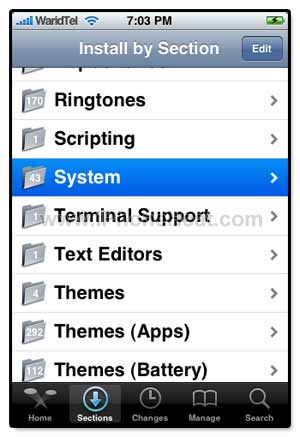
Now there are two ways to find iBluetooth. One is through Sections tab and other using Search tab. I’ll show you both

Through Sections Tab

  1. Go to Sections Tab available at the bottom (2nd from left)
  2. From the list under Sections Tab, find System and press to open.
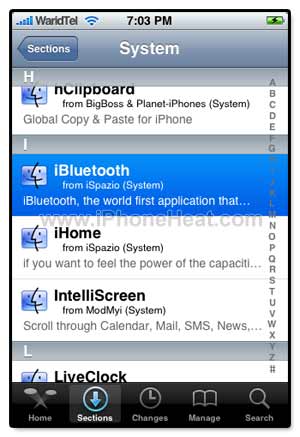
  3. From the packages listed, Locate iBlueTooth and Press to Open

transfer-files-from-iphone-using-bluetooth-02transfer-files-from-iphone-using-bluetooth-01transfer-files-from-iphone-using-bluetooth-02

Through Search Tab

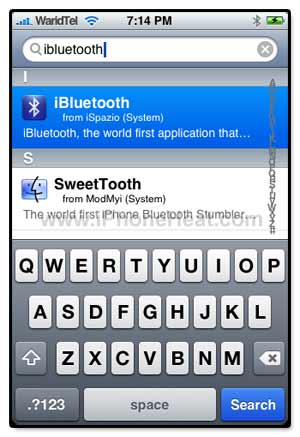
  1. Go to Search Tab available at the bottom (most right)
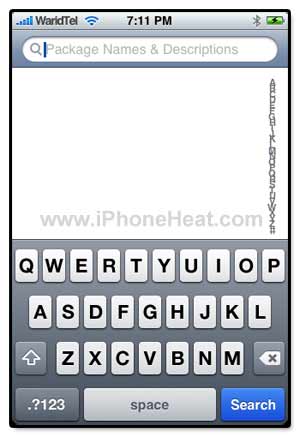
  2. Press on the Search bar appeared at the top and type: ibluetooth.
  3. In the search results you will find iBlueTooth, Press to open it.
transfer-files-from-iphone-using-bluetooth-02transfer-files-from-iphone-using-bluetooth-01transfer-files-from-iphone-using-bluetooth-02

After selecting iBlueTooth, Press “Install” button at the top right corner of your iPhone screen.
transfer-files-from-iphone-using-bluetooth-01

Press “Confirm” button at the top right corner to start installation.

transfer-files-from-iphone-using-bluetooth-02

After downloading iBlueTooth, iPhone will automatically install it. When you’re done with the installation, Press “Return to Cydia” button at bottom.
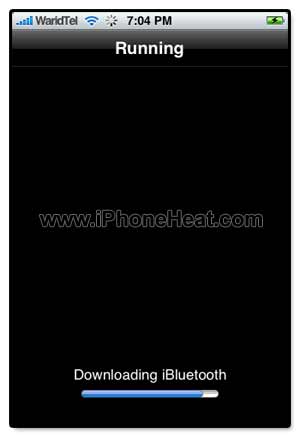
transfer-files-from-iphone-using-bluetooth-01transfer-files-from-iphone-using-bluetooth-02

Then Press Home Button to return to SpringBoard where you will find a new iBluetooth icon. From SpringBoard, go to Settings.

transfer-files-from-iphone-using-bluetooth-01

From “Settings” Menu, Press to open  “General

transfer-files-from-iphone-using-bluetooth-02

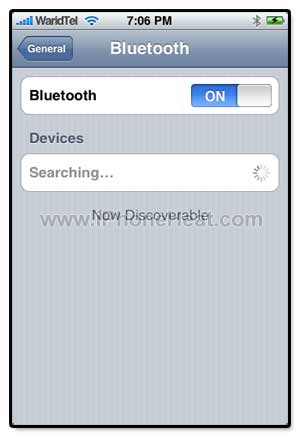
Under “General” menu, go to “Bluetooth

transfer-files-from-iphone-using-bluetooth-01

Turn Bluetooth ON.

transfer-files-from-iphone-using-bluetooth-02transfer-files-from-iphone-using-bluetooth-01

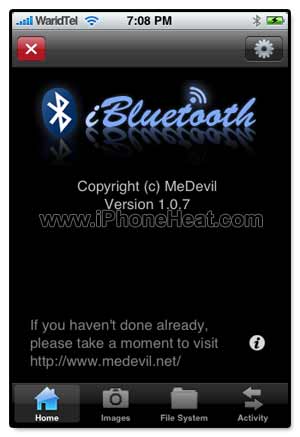
Press the “Home” button to go back to SpringBoard and execute “iBlueTooth” that we have just installed.

transfer-files-from-iphone-using-bluetooth-02

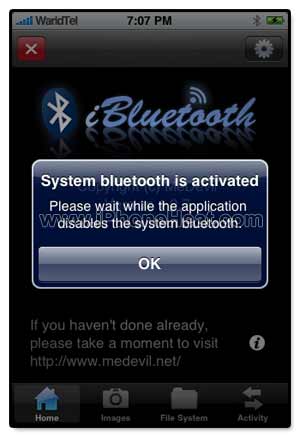
After loading, iBluetooth will prompt you that its disabling system Bluetooth. Press OK button

transfer-files-from-iphone-using-bluetooth-01transfer-files-from-iphone-using-bluetooth-02

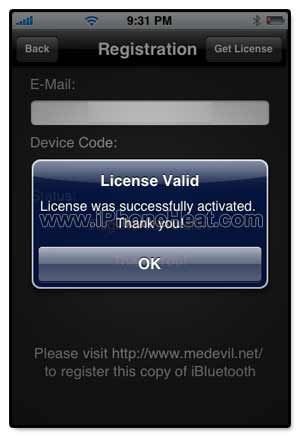
Now you will be asked to get register by visiting http://www.medevil.net and in iBluetooth input the registered email and press “Get License” button at top right of the screen.  it OK button. and then Back at top left
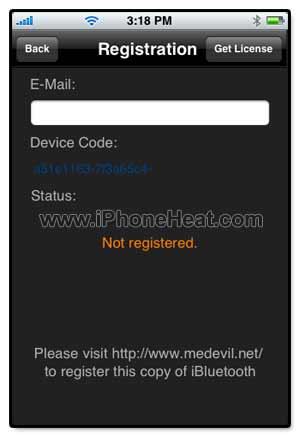
transfer-files-from-iphone-using-bluetooth-223transfer-files-from-iphone-using-bluetooth-224

transfer-files-from-iphone-using-bluetooth-01

Press the Images button at the bottom of the screen and select any image. I have selected my Nokia n95 image to whom I’m transferring this image. After selecting the image press send button at bottom middle

transfer-files-from-iphone-using-bluetooth-02

iBlueTooth have searched for bluetooth active devices and have found my n95.

transfer-files-from-iphone-using-bluetooth-01

Select the desired destination device to transfer the file and hit Send button at bottom.

transfer-files-from-iphone-using-bluetooth-02

That’s it. Don’t forget to leave your comments.

Happy sharing files.

Update 1:

iBlueNova is the new iBluetooth and supports iPhone OS 3.x.

Update 2:

How to: transfer files from iPhone via Bluetooth using iBlueNova

If this page or section of the page needs to be updated, Submit Request

Comments:

  1. Umar Hafeez 12 April 2009 at 6:08 am #

    I want to ask 1 thing that is there any application with which we can transfer songs via bluetooth.I have transfered images.These are transfering .What about songs.

  2. Umar 13 April 2009 at 8:17 pm #

    I want to ask that i have followed above guide.bt when i turn on my fone bluetooth then a circle appears and its rotating.means phone processing to turn on bluetooth.I have waited for 8 min bt it doesnt turn on.when i comes to main menu then smtimes it automatically turns on.then i can easily transfer files.after sometimes it will automatically turn off.can u tell me the problem.plz.

  3. Admin 13 April 2009 at 11:36 pm #

    may be some issues at software level..

  4. Umar 13 April 2009 at 11:54 pm #

    one thing more on authorization issue.Can i create two apple free ids on itunes store.i have one and it has used total 3 authorizations out of 5.how this is solved.

  5. Umar 13 April 2009 at 11:59 pm #

    every time i install windows then i have to reauthorize my computer.so when i have ended these 5 then what will i do.plz tell me.

  6. gabru 20 April 2009 at 1:31 pm #

    I have follow above mention instruction , But when i press on Ibluetooth , its display the msg like “THE APPLICATION BLUETOOTH CANNOT BE OPENED ”
    WHAT DOES IT MEANS ? AND WHAT’S THE SOLUTION .
    PLEASE REPLY
    THANKS IN ADVANCE

  7. dr.j 25 May 2009 at 9:10 pm #

    so u can send FROM iphone to others. how about to receive? will that work. iphone 2 iphone ???
    iphone has a stupid idiot SW..OS. standard features u have to download 1st, oh jailbreake first so u can use it what other fones an do without to download apps from the internet.
    fukkin crap device.. sorry software.!

  8. Dee Jay 7 July 2009 at 8:55 pm #

    This software is HORRIBLE! it just keeps crashing on my iphone!! it gets to the point of sending the file/picture and it connects to the other device and then the program just closes and causes the other phone to get stuck… I think we should just leave the BT services to Apple. There was a reason it was turned off.

  9. Sandra 16 September 2009 at 4:53 pm #

    I’m using this software without any problem… It works perfectly both when recieving and sending files (pictures, music, documents etc.). The phone is not crashing and everything is fine. you can send files to other phones, you can send files to other iPhone users which have the same application installed on their phone.
    In my opinion it’s the best solution (for now) for the bluetooth issue in iPhone.

  10. Mike 19 October 2009 at 2:45 pm #

    Hi Guys, I have a iphone 3gs OS 3.1. I bought this phone from Hong Kong and can use with any sim card without jailbraking it. However I need to install cydia in order to get more applications. Appreciate someone can help me on this

    • iPhone Heat 19 October 2009 at 2:48 pm #

      Without jailbreak the only way to get Apps is iTunes App Store..
      and btw Cydia means Jailbreak…

  11. Mike 19 October 2009 at 2:53 pm #

    Pls tell me how to jailbreak iphone 3gs OS 3.1 pree installd phone.

  12. Jaink007 26 October 2009 at 1:33 am #

    I tried installing this ibluetooth on jailbroken 3.0.1 3GS, and I followed the exact method shown above to install this app from cydia. Now the problem I m facing is an error (stack error) wenever I open the ibluetooth. As I dnt Knw wat this mean Plzz anyone can help me to solve this error, I’ll be highly appreciated!!

  13. Peter 2 November 2009 at 6:01 am #

    I got a same stack error:

    “Error
    Unable to start the stack, please try restaring the application. If the problem persist, try rebooting the device.”

    Try both but still facing the error.

  14. boleh7 7 November 2009 at 5:51 pm #

    I also have the same stack error for my 3GS OS3.1.2 :-(

    Please help :-)

    Cheers

  15. Vnion 19 February 2010 at 8:34 am #

    Bluetooth! That’s great. Before this, I get this guide for help:

    http://www.transfer-iphone.com/transfer-songs-videos-photos-playlists-from-iphone-to-computer.html

    Thank you.

  16. Bourne 26 February 2010 at 9:33 am #

    Hey….. I have BlueNova or iBluetooth 2 for my iphone 3GS. I need to know how do i view the files that have been transferred on to my phone.

    I have recently transferred and image file and a music file. But how can i transfer this image to the library and music to the ipod????

    Please help!!

    • iPhoneHeat 26 February 2010 at 10:04 pm #

      checkout the iBluenova guide under the iPhone guides category

      • Banterman 27 February 2010 at 12:56 pm #

        Can you please give a link…. Thanks!!

  17. asd 18 March 2010 at 6:16 am #

    HOW DO YOU SEND FRIGIN GAMES!!!!!!! PLZZ SEND ME AN MAIL ON alienware2000@hotmail.com

  18. James 1 May 2010 at 10:41 pm #

    So sad you paid 500 for a the shittiest well made phone i’ve ever seen.

  19. stages 2 November 2010 at 4:37 am #

    good proguct

  20. macau 23 December 2010 at 2:49 pm #

    tnx all.

  21. wingwingto 8 March 2011 at 10:55 am #

    Is it work on 4.2.1?

  22. raybak 9 May 2011 at 6:49 pm #

    thanks so its only used for sending pictures and videos? but we cnanot send songs and rigntone?

  23. erharisheee 16 June 2011 at 4:56 pm #

    i did not found any of the ibluetooth software in the cydia

  24. Rakib 3 November 2011 at 7:13 pm #

    It is very essential. I appreciate it very much. Thank you for such a service.

  25. Yalahks 9 December 2011 at 9:12 pm #

    I can’t find iBluetooth in my Cydia, followed the same steps but I couldn’t find it in system. I am running 4.3.3 in 3GS 32GB. What can I do?

  26. damneddle 19 February 2012 at 11:53 am #

    Can’t find iBluetooth and iBluenova. Any update on this?

  27. marksabida 21 February 2012 at 8:44 am #

    why i cant find ibluetooth on my cydia even if i search it?

  28. Bodduluri gowtham 21 March 2012 at 8:07 pm #

    I works on iPhone 3GS or not

  29. Bodduluri gowtham 23 March 2012 at 12:16 pm #

    I have iPhone 3GS IOS4.3.3 I downloaded ibluetooth I cannt open it why

  30. saurav 29 March 2012 at 2:13 pm #

    but sir i have ios 5.1 will it really works with ios 5.1

  31. ganesh 17 June 2012 at 9:47 pm #

    will there be any problem due to jailbreak the iphone???????????????????????????????????

  32. Luke 29 June 2012 at 7:12 pm #

    i not use this software yet, is it safe?

  33. Naimul Hasan Ripon 1 July 2012 at 5:04 pm #

    Good, but can I send files any normal phone by this system?

  34. sainaunt 13 July 2012 at 10:14 am #

    plese,i need itunes 32bits

  35. Sumukh Aroskar 30 July 2012 at 10:25 am #

    Unable to transfer songs using Bluetooth, I have LG K195 and I want to transfer songs to phone Micromax using Bluetooth Model No x 291.


Leave a Reply