How to Put iPhone in DFU Mode

Sometimes, in order to restore your iPhone firmware using iTunes, you need to put iPhone into Recovery Mode. But if recovery mode doesn’t work for you and you could not restore you iPhone, then you need to Put your iPhone in DFU Mode. Lets learn how to enter iPhone in DFU Mode in order to restore its firmware.

iphone dfu mode

What is DFU Mode

DFU stands for Device Firmware Update. Unlike Recovery Mode, DFU Mode doesn’t load the firmware/OS currently installed before restore attempt. DFU mode will be considered as a last resort to restore if a restore using Recovery Mode doesn’t work and you are getting error while restoring you device.

How to Put iPhone in DFU Mode

Step 1
Open iTunes and connect the iPhone via USB.
itunes-logo

Step 2
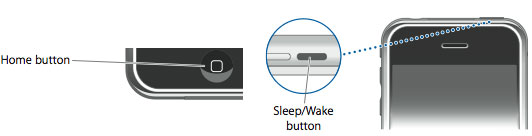
Press and hold the Home button and the Sleep/Wake button at the same time.
iphone-dfu-mode-1

Step 3
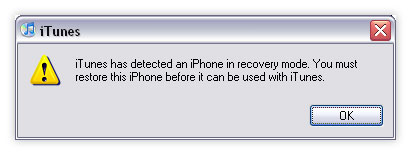
Continue holding the both buttons for exact 10 seconds. Then release the Sleep/Wake. Keep holding the Home button until iTunes pops up that it has found an iPhone in Recovery Mode.
iphone-dfu-mode

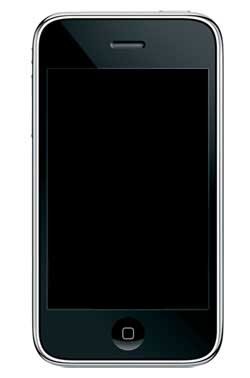
Your iPhone screen will look like this:
iphone-dfu-mode-2

***NOTE***

It may take a few attempts to get your iPhone into DFU mode. Generally, I hold down both buttons then release the Wake/Sleep button just before I think the Apple logo would appear. If you are still holding both buttons down and you see the Apple logo you are holding them down for too long!

If this page or section of the page needs to be updated, Submit Request

Comments:

  1. tom 19 August 2009 at 5:15 am #

    nice post my friend, as you said after the step3 i got message on my itunes that its in recovery mode. So i restored, but still it s in recovery mode, because when i tried to jailbreak its stopping in between. So please tell me after the step 3 seeing the message on the itunes what do i need to do to get DFU mode?? Thanks in advance

  2. lee 19 August 2009 at 6:04 pm #

    Just switch the iphone off and use redsn0w to jailbreak, redsn0w will guide you through the DFU mode as you go.

    • god 23 September 2010 at 2:19 pm #

      the guy can not use that if hes not using a mac pc. read the info before giving anyone advice

  3. Dane 13 October 2009 at 1:39 pm #

    iPhone DFU Mode Animation: http://www.youtube.com/watch?v=aES6bEY18F4

    • zain 18 April 2012 at 12:48 pm #

      it says the video is private .. cannot view it dude …

  4. uttegrakest 23 October 2009 at 11:51 am #

    Thanks for guiding me through how to put iPhone in DFU MOde

  5. anon 30 October 2009 at 11:27 pm #

    The redsn0w DFU instrctions are different, and do not always worked. That’s what happened to me, and these instructions got it working for me. Thank you

  6. andre 8 January 2010 at 10:45 am #

    my iphone refuses to go on dfu..i know how to put it on dfu coz i already did those steps when i was upgrading my 1.1.4 to 2.0 2.2 and 3.0 i have 2g iphone…but now it doesnt seem to work i was trying to jailbreak and unlock on OS 3.0 using redsnow but it cant i mean it wont go into dfu even when im in itunes its not reading… any thoughts about this or help is highly appreciated…thank you…

  7. Bryan 17 July 2010 at 5:29 am #

    Pretty good instructions. I also found this how-to video helpful to walk me through the steps: http://www.wonderhowto.com/how-to-put-unresponsive-iphone-into-dfu-mode-259739/

  8. jimberieJ 20 July 2010 at 12:51 am #

    thanks u saved me alot of money :) I thought the iphone was fuked

  9. Sithron 24 July 2010 at 9:42 pm #

    I just tried this and im getting error 3194, i have a 3gs version 4.0 and i only have to the shsh for 3.1.2. i tried to downgrade but im getting an error

  10. BABIGIRL 14 August 2010 at 2:13 am #

    OMG!! Thank u soooo much, u saved me big time! I thought was phone was going to have to be repaired! TY!!!!

  11. JasonLim 1 September 2010 at 10:33 pm #

    Thanks!! It worked! I’m trying hard to downgrade from 4.0.2. Need a jailbroken iPhone

  12. kito 21 October 2010 at 1:42 pm #

    My iphone lock, I buy iphone 1 day ,I connent Iphone to Itunes,and I update version. Help me please. I would live to use mobilephone.
    Device: iPhone3G 4.0 (8A293) Model: MB489J/A Name: kitolsv UUID: A8745D388EF61CC412C84473B0C5E9EC56DC4CB3 Baseband: 05.14.02 – 6.4_M3S2

  13. Dipesh Kotecha 2 November 2010 at 6:02 am #

    I got my iphone locked since i upgraded to version 4.1 when syncing with itunes..Please help me to jail break and unlock it..

  14. sequi 1 March 2011 at 3:02 am #

    hello sir and mrs, i need your help with my iphone 3g.before i sold my ipod touch i was geting wi-fi connectoin with yhe internet that i’m using on my PC(wireless) but i bhought an iphone 3G and i’m trying to connect wi-fi is not finding the wireless of my PC… i went on youtube to learn or get more information but until now i my iphone 3G can’t find any wireless connection and im so tired please help me to find a solution please…

  15. pesslovany 5 June 2011 at 7:26 pm #

    I do it like this: 3sec power then 10sec power and home then relase power and wait till pc dont do noise like connetct then relase all buttons, this instructions are strange….

  16. snead_09 16 June 2011 at 3:48 am #

    I’m trying to break my phone. I cant do it I need some help.

    • Fredo 22 June 2011 at 12:22 pm #

      Use a hammer!
      If you want help, the least you can do is provide proper information so that other people can help. If you do not show any interest in learning, no one will help.
      For next time, try something like:
      Hi, I have an iPhone 3GS running OS 4.1 I don’t want to update to 4.3.3 but I want to Jailbreak. I tried this, this and that and the results were these… Am I doing something wrong? Am I missing something?
      Thanks for helping!

      ^^ this should, generally, make someone want to help you and not think you’re a total id10t!

      Good luck!

  17. idontcareimjustmadiwastedtime 6 July 2011 at 12:10 pm #

    YOU FORGOT TO MENTION THAT YOU HAVE TO TURN THE DEVICE OFF BEFORE PUTTING IT IN DFU MODE.. KINDA IMPORTANT, I SPENT HOURS TRYING TO DO IT AND WAS WONDERING WHY IT WASN’T WORKING

    • MrPiickle 7 July 2011 at 12:43 am #

      No, this guide is for getting from “Restore Mode” to “DFU”.. It’s works a treat, I just done it…

  18. greatkenji 14 August 2011 at 5:22 pm #

    how to restore my ipod without updating?

    • MrPiickle 20 October 2011 at 8:16 pm #

      Search the IPSW of the software you want and do a shift-restore.

  19. blaine 20 October 2011 at 4:26 am #

    Thanks, Worked great for my iphone. I used the manual way.

  20. Rhys 30 November 2011 at 10:56 am #

    Have iphone 3gs trying to restore in recovery and dfu mode it gets right to the end and comes up with error (-1) what can i do?

  21. sylvester 31 December 2011 at 2:14 am #

    itried to do update my iphone3gs to 4.3
    yh but it block my fone
    bt i need the 4.3 doe
    how am i gonna get it

  22. sylvester 31 December 2011 at 2:15 am #

    can u show me how to get 4.3 on my iphone 3gs
    without being blocked

  23. candy ken 17 March 2012 at 2:38 am #

    my phone went off when trying the DFU mode.what should i do next

  24. candy ken 17 March 2012 at 2:52 am #

    my went off when try to trying to get my iPhone into DFU mode

Trackbacks/Pingbacks

  1. How to jailbreak Ios5 Beta with snowbreeze 2.8beta1(Tethered) | DeltaGSM.net
  2. How to Jailbreak iOS 5 Beta with Sn0wbreeze 2.8b1 | iPhoneCream.com
  3. Fix Error 3194 When Restoring Stock or Custom Firmware | TeenPhanRang.Net NEWS
  4. How to Jailbreak iPhone 4, 3GS 4.3.3 with RedSn0w
  5. Download RedSn0w 0.9.9b1 « « techknowtard.com TechKnowTard
  6. Jailbreak iOS 5 with RedSn0w | iPhoneHeat
  7. Jailbreak iOS 5 with RedSn0w | Rumorslogy
  8. Jailbreak iOS 5 v?i RedSn0w 0.9.9b4
  9. Untethered Jailbreak, Tethered Jailbreak, Semi-Tethered Jailbreak | iPhoneHeat
  10. Untethered Jailbreak, Tethered Jailbreak, Semi-Tethered Jailbreak | AppleNo1.com
  11. Untethered Jailbreak, Tethered Jailbreak, Semi-Untethered Jailbreak | iPhoneCream.com
  12. Types of Jailbreaks | Joseph W. Becker
  13. How to Jailbreak iOS 5.0.1 / iOS 5 with Ac1dSn0w | iPhoneCream.com
  14. How to Jailbreak iOS 5.0.1 / iOS 5 with Ac1dSn0w - MobilesPortal
  15. Jailbreak iPhone 4, 3GS iOS 4.3.1 with Sn0wBreeze 2.4b [Guide] | iPhoneHeat
  16. How to Jailbreak iPhone 4.3.1 Using Sn0wBreeze 2.5 [Untethered] | iPhoneHeat
  17. [iphone] jailbreak wtfs by slogg - TribalWar Forums
  18. How to Jailbreak iOS 5.0.1 with PwnageTool [Custom Firmware] | AppleNo1.com
  19. Am un iphone 2g si am o mare problema!!!!
  20. Jailbreak iPad iOS 5.1 with RedSn0w | iPhoneHeat
  21. How to Jailbreak iPod Touch 4G, 3G iOS 5.1 with RedSn0w | PbCrew.Info
  22. Downgrade iPhone 4S iOS 5.1 / iOS 5.1.1 to iOS 5.0.1 With Redsn0w | iPhoneHeat
  23. How to Jailbreak iOS 5.1.1 with RedSn0w | iPhoneHeat
  24. How to Update iPhone 4, 3GS Without Updating Baseband [RedSn0w Guide] | iPhoneHeat
  25. How to Update iPhone 4, 3GS Without Updating Baseband [RedSn0w Guide] | iPhoneHeat
  26. rohmansyah.info » How to Jailbreak iOS 6.0.1 with RedSn0w | rohmansyah.info

Leave a Reply